Step 1: Add a UISearchBar to your UITableView and create an outlet for it.
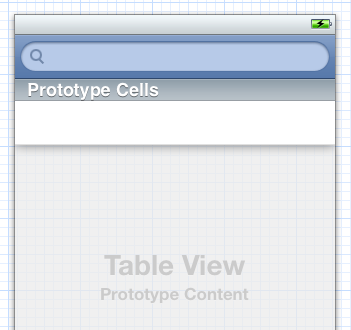
Step 2: Add properties for the array of all the table data, and the array of filtered table data.
@property (strong, nonatomic) NSMutableArray* allTableData;
@property (strong, nonatomic) NSMutableArray* filteredTableData;
Step 3: Assign your search bar’s delegate to your controller class.
-(void)viewDidLoad
{
    // ...Do initialization stuff here...

    searchBar.delegate = (id)self;
}
Step 4: Implement the searchBar:textDidChange: method from the UISearchBarDelegate protocol. This will let you filter your list as you type. If you want to filter when the search button is clicked, use the searchBarSearchButtonClicked: method instead.
In this example, we are searching through a list of foods with names and descriptions to see if the match the search text. If they do, we add them to our NSMutableArray containing our filtered foods. We also set a flag that indicates whether or not we are currently filtering the list.
-(void)searchBar:(UISearchBar*)searchBar textDidChange:(NSString*)text
{
    if(text.length == 0)
    {
        isFiltered = FALSE;
    }
    else
    {
        isFiltered = true;
        filteredTableData = [[NSMutableArray alloc] init];

        for (Food* food in allTableData)
        {
            NSRange nameRange = [food.name rangeOfString:text options:NSCaseInsensitiveSearch];
            NSRange descriptionRange = [food.description rangeOfString:text options:NSCaseInsensitiveSearch];
            if(nameRange.location != NSNotFound || descriptionRange.location != NSNotFound)
            {
                [filteredTableData addObject:food];
            }
        }
    }

    [self.tableView reloadData];
}
Step 5: Modify our other UITableViewController methods to make them aware of the isFiltering flag, and to use the correct list depending on whether or not we are filtering.
- (NSInteger)tableView:(UITableView *)tableView numberOfRowsInSection:(NSInteger)section
{
    int rowCount;
    if(self.isFiltered)
        rowCount = filteredTableData.count;
    else
        rowCount = allTableData.count;

    return rowCount;
}

- (UITableViewCell *)tableView:(UITableView *)tableView cellForRowAtIndexPath:(NSIndexPath *)indexPath
{
    static NSString *CellIdentifier = @"Cell";

    UITableViewCell *cell = [tableView dequeueReusableCellWithIdentifier:CellIdentifier];
    if (cell == nil)
        cell = [[UITableViewCell alloc] initWithStyle:UITableViewCellStyleSubtitle reuseIdentifier:CellIdentifier];

    Food* food;
    if(isFiltered)
        food = [filteredTableData objectAtIndex:indexPath.row];
    else
        food = [allTableData objectAtIndex:indexPath.row];

    // ... Set up the cell here...;

    return cell;
}
Voila! You now have a UITableView that can be filtered using a UISearchBar.
Download the UITableView Filtering Demo Project (updated July 8, 2012 to show row selection and disclosure indicator handling).
Thanks for the tutorial. I tried recreating this and had one problem. I’m using a “Custom” cell through iOS5 storyboarding. The problem I see is that when getting back items from my filtered array the custom UITableViewCell comes back as null. In iOS5 I understand you should only have to get a cell via dequieReusableCell and not explicity init a cell. However when the search in the search bar successfully matches the cell comes back as null. I’m not sure how I can manually init my cell with the custom style. Any ideas?
Here’s a snippet from my cellForRowAtIndexPath method.
ItemCell *cell = (ItemCell *)[tableView
dequeueReusableCellWithIdentifier:CellIdentifier];
self.searchBar.tableView.
if (cell == nil){
NSLog(@”Why is this happening when I get a successfull match from the search bar?”);
}
This causes the following error :
Assertion failure in -[UISearchResultsTableView _createPreparedCellForGlobalRow:withIndexPath
*** Terminating app due to uncaught exception ‘NSInternalInconsistencyException’, reason: ‘UITableView dataSource must return a cell from tableView:cellForRowAtIndexPath:’
[…] I’m using ios5 storyboard and have a tablview with a uisearchbar that I’m using the filter the results. I’m following the tip from the following blog post where I also posed this question /blog/2012/01/08/ios-quick-tip-filtering-a-uitableview-with-a-search-bar/: […]
Hey imran, thanks for the comment.
Using custom cells while filtering is working for me. as long as I make sure to set the cell’s identifier in my storyboard, and pass that identifier to dequeueReusableCellWithIdentifier:
static NSString* CellIdentifier = @”MyCustomCellIdentifier”;
UITableViewCell* cell = [tableView
dequeueReusableCellWithIdentifier:CellIdentifier];
And if you have a custom ItemCell class, you should just have to set that as the Custom Class in your cell’s Identity Inspector in your storyboard.
If you’re already doing that, then I’m afraid I have no idea why it wouldn’t be working!
Hey Marty, thanks for the quick reply. I figured out my problem. I had setup my controller hierarchy incorrectly ( I wanted a navigation controller inside a tab controller ). Anyways, by fixing that problem everything works. Thanks for the help!
That’s great to hear, thanks for the update!
Hello, I was trying to make the searchBar…But as you didn’t make the whole script I got confused.
Can you release the entire project or just say which are the types of the variables, text, food…
I coudn’t understand the Step 4…that’s why I got confused…
I don’t know what kind of variables I’ll need for that or what I should attribute for that variables…
Can you give me a hand? Thanks.
Hey, thanks for the comment. I am currently on the road but when I get back I can put up the entire project.
The Food class is just a simple class with a name and a description property. In step 4, the code searches through all the Food objects to find the ones whose name and/or description match the search text.
[…] post on Filtering a UITableView with a search bar has been the most popular post on the site. Thanks to that popularity, I have had a number of […]
Thanks for the tutorial. It was a great help implementing search in my tableview!
Great tutorial. Thanks.
Hi thanks alot for this tutorial it was exactly what I was looking for and I have a question how can I remove the keyboard when I hit search ? I know I should use the [searchBar resignFirstResponder]; but where should I put it ?
Another question is it possible to return the main list if the user deleted whats inside the search bar ??
Again Thx alot for this tutorial
-(void) searchBarSearchButtonClicked:(UISearchBar *)searchBar
{
[searchBar resignFirstResponder];
}
The code provided above is already handling that in the textdidchange. When the search bar text box length is 0, it sets isFiltered to False. Then it reloads the tableview.
Hey Marty. Thanks for sharing this. Very helpful. I had a followup question to what Ed has asked. I coded this in my app and it works when I first hit Search. The keyboard does go away. But now when i press the small x button on the right side of the search bar to delete the search text, the key board still remains and there is no way to make it go for the user. What function do i need to implement with the same [searchBar resignFirstResponder] call?
This tutorial was nice, but I have a request. Can anyone show me how to use the search bar to select and scroll to the results? I have an array setup with Serial#. I would like to search for the serial number (i.e. 459) and it high light the closest serial number (i.e. 500), and scroll to that cell in the tableview.
I am at a loss and just really getting into this – so all help will be appreciated greatly.
Hey there!
Well, I thought this would be easy, but I can’t seen to get the row to actually select.
Here’s what I did so far:
-Loop through for your items to find the index of the item with a serial number closest to the one you are searching for. Store this in a variable called index.
-Select the row, using the following code:
NSIndexPath* indexPath = [NSIndexPath indexPathForRow:index inSection:0];
[self.tableView selectRowAtIndexPath:indexPath animated:NO scrollPosition:UITableViewScrollPositionTop];
This scrolls to the correct row, but it doesn’t seem to actually select it. The same code works perfectly if you do it in, for example, viewDidAppear, so I think that the problem is caused by doing it in -(void)searchBar:(UISearchBar*)searchBar textDidChange:(NSString*)text. I will have to do a bit more investigation to figure out why selection isn’t working in this case.
Marty, thanks! I just got in town, so I will give this a shot.
OK, maybe I am missing something. I could not get any of this to work – maybe it is the rookie showing. Can you elaborate more or email me an example of the code you have working?
Try using this code in the textDidChange handler. I’ll assume you already have an algorithm to find the index of the item with the serial number closest to the one you are searching for. If you don’t, let me know.
-(void)searchBar:(UISearchBar*)searchBar textDidChange:(NSString*)text
{
int row = …. // Insert your code to find the closest serial number here.
NSIndexPath* indexPath = [NSIndexPath indexPathForRow:row inSection:0];
[self.tableView selectRowAtIndexPath:indexPath animated:NO scrollPosition:UITableViewScrollPositionMiddle];
}
Marty, I am so thankful for your help. I’ll get my head wrapped around all of this soon. In reply to your reply, I am ashamed to admit that I don’t have an algorithm to find the closest query. That was part of my original issue. So if you could share, I would appreciate it.
Again, thanks for all the help, I’ll pay it all forward one day – some how.
No problem!
So, I’ll assume you have some sort of ‘Product’ class that has a serial property, and you want to filter your list of products. The simplest algorithm to find the product with the closest serial number would be to loop through all of the products, calculating how close each product is, and keeping track of which product is closest.
This is assuming that your ‘serial’ is just a number. If it’s a string, and can contain letters, then things get a bit more complicated, but the basic algorithm is the same – loop through all products, keeping track of the closest one.
-(void)searchBar:(UISearchBar*)searchBar textDidChange:(NSString*)text

{

    int closestDifference = INT_MAX;

    int closestSerialIndex = -1;
int enteredSerailNumber = [text intValue]; // TODO - handle case where we typed in something that's not a number
for(int i = 0; i < allTableData.count; ++i) { Product* product = (Product*)[allTableData objectAtIndex:i]; int difference = abs(product.serial - enteredSerailNumber); if(difference < closestDifference) { closestDifference = difference; closestSerialIndex = i; } } // closestSerialIndex now contains the index of the row with the closest serial number }
Thank you for this! I’ve been putting off adding a SearchBar to my view because all the other tutorials I’ve tried have just made it so hard to do.
Yours = amazing! Brilliant work!
Thanks.
Hey, thanks for the comment! Glad that you found it useful.
Fantastic. Simple. Works. Useful.
Thanks a lot for the tutorial. I have disclosure indicator in my tableView cells, but in the filtered data i can’t see the disclosure indicator, Please help me for this. thanks
Hey, I’m afraid I can’t reproduce this. I took the demo project and added a disclosure indicator to the tableview cell in the storyboard, and it still shows up when the table is filtered. Are you adding the disclosure indicator manually in the cellForRowAtIndexPath method?
I have a UISearchBar with SearchDisplayController, in a TableView, Everything is working fine, but when the user select a particular row of the filtered Result tableview, it is not going to the detail view. and the UISeachbar keyboard is also not dismissing. please help
Hey, I just updated the sample project to show the selecting of rows and detail views while filtering. You can get it from /blog/wp-content/uploads/2012/01/UITableViewFilterDemo.zip.
As for dismissing the keyboard, all you have to do is call [self.searchBar resignFirstResponder];.
Great tutorial. Several problems though. First off I cant select a row when searching to push to a detail view. Second when I hit the cancel button after searching it only load the search results. Please can you provide me with cod to solve this?
Hey, I just updated the sample project to show the selecting of rows and detail views while filtering. You can get it from /blog/wp-content/uploads/2012/01/UITableViewFilterDemo.zip.
To handle the cancel button, just add the following method to your view controller:
– (void)searchBarCancelButtonClicked:(UISearchBar *)searchBar
{
self.searchBar.text = @””;
[self.searchBar resignFirstResponder];
}
Thanks for the reply I will try it out:)
The updated tutorial worked like a charm thanks:) Just one question how do you hide the keyboard when the x button in the search bar is clicked?
nvm I find out how to thanks again
Hey I want to display an image and description depending on which cell was tapped. Would you mind posting code on how to do so? BTW your tutorials are by far the best. I will always come to this site for help:)
Hey, thanks! 🙂
When you say display an image and description, do you mean display them in the cell that was tapped? Or in a new view? Or somewhere else?
I mean like in a new view.
You can do something this:
-(void)tableView:(UITableView *)tableView didSelectRowAtIndexPath:(NSIndexPath *)indexPath

{

    UIImage* image = ... // Your image goes here

    NSString* description = ... // Your description goes here
UIView* view = [[UIView alloc] initWithFrame:self.view.frame];
UIImageView* imageView = [[UIImageView alloc] initWithImage:image];
UILabel* label = [[UILabel alloc] initWithFrame:self.view.frame];
label.text = description;
[view addSubview:label];
[view addSubview:imageView];
UIViewController* c = [[UIViewController alloc] init];
c.view = view;
[self.navigationController pushViewController:c animated:true];
}
Or you could use a view you defined in your storyboard. There are lots of ways you could do it!
Thanks I can totally understand this:)
hello, thanks for this tutorial that was really good for me.
the only thing that does not work is the “searchBarCancelButtonClicked” event.
if I well understood this event should be called when the x button in the search bar is pressed, but nothing become, why?
Very easy to understand and does the thing. Thanks!
Thanks for this tutorial! Great help in finding my way to integrate a UISearchBar. I just like to know if you can help me with my table that has sections all over it and on how can I search all over it. I’d like to know how can I properly implement the textDidChange, the numberOfSections and lastly, the titleForHeaderInSection methods? Basically, I have a root dictionary of arrays and in those arrays are dictionaries with 5 keys and in my table, one of those 5 keys (say “namekey”) are the one displayed on the rows. Can you help me figure it out?
Thanks for this amazing tutorial. I need a little help, though. My list (tableview) is not changing the items displayed in it, any idea why? I believe the [self.tableView reloadData] is not working.
Solved it! was my mistake. Sorry. Everything worked. Amazing tutorial 😀
Thanks, this was really easy to follow.
Appreciate it 🙂
HI!
Excellent article, I have a question, how do I for hide the table when the app finish launching, and show it this after, when user start typing a letter in a searchbar?
thanks
regards
Hey,
Just want to say thank you for the tutorial, it’s very simple, understandable and it works well when i tried it on splitview. 🙂
Do you know how to implement this search if i want to use sqlite database for the table data?
Once again thank you!
Hey, you are welcome!
If you are using sqlite, you’ll have to change the searchBar:textDidChange method to search your sqlite database. Sounds like a good idea for a future post! 🙂
Great tut. Very useful. One question though. How do you add a image to the detail view, so when the user selects the row the name description and the image if the item appears in detail view?
Thanks
Hi Marty, thanks for this great tutorial. I found it really helpful! I compiled a list of top resources on implementing an ios searchbar in tableview. Other developers may find this list useful. I included your post. http://www.verious.com/board/Giancarlo-Leonio/implementing-an-ios-search-bar-in-table-view/
Thank you!
Nice resource list, thanks for posting it!
Awesome tutorial…. I was scared to implement the search bar but following the tutorial it took me just 30 minutes and I was done….. Thanks thanks thanks!!!
You are very welcome; glad you found it useful!
How do I add a different small image in each cell?
Please help me, I’m confused…
Just write some code that I can try to use.
Thanks a lot for your help.
Best Regards
Felix
Hey, adding an image to each cell is pretty simple. In your cellForRowAtIndexPath: method, you just need to set your UITableViewCell imageview’s image. For example, this StackOverflow post demonstrates a simple way of doing it:
- (UITableViewCell*)tableView:(UITableView*)tableView cellForRowAtIndexPath:(NSIndexPath*)indexPath { static NSString* CellIdentifier = @"Cell"; UITableViewCell* cell = [tableView dequeueReusableCellWithIdentifier:CellIdentifier]; if (cell == nil) cell = [[[UITableViewCell alloc] initWithStyle:UITableViewCellStyleDefault reuseIdentifier:CellIdentifier] autorelease]; cell.textLabel.text = @"I'm a UITableViewCell!"; cell.imageView.image = [UIImage imageNamed:@"MyReallyCoolImage.png"]; return cell; }Thanks, really useful !
thank you for such nice tutorial , i have implemented it on my application and work really well thank you so much , i have search many tutorial for this but not satisfied ,thank you keep writing
Thanks. Help me a lot.
Hi Great tutorial, is it possible to filter by a dropdown list? thanks
Great tutorial!
Love this tutorial. What if you had a lot of data and wanted to use a Plist instead of simply including the entire array inside your .m file. I’ve been struggling to get that to work. What do you think it would need to work?
Thanks for useful info.
One improvement – it make sense to add autorelease pool for forin
How can this be implemented if my data comes from a web service?
I just load a predetermine amount of records when the screen loads after that if the user pressed load more it would bring another bunch of records. But when they search for an specific record the request is sent to the web service to bring the new data. In my case I’m not performing search for the current records on displayed on the table.
Hi Marty, thanks for your post. I was trying to implement this in my table view where I pulled data from outside DB by using json. However, when I’m trying to type anything on the search bar the app crashes… my code is given in the below link. I would highly appreciate if you kindly help me on this.
http://stackoverflow.com/questions/22725765/uisearchbar-in-xocde-5
Cheers,
Asif…
Hey Asif, thanks for the comment!
It looks like the problem is that some of the objects you are loading from the JSON have a title that is not an NSString, but an NSNull. Adding a check for NSNull in the textDidChange: method should solve the problem:
if(![sTitle.name isKindOfClass:[NSNull class]]){
NSRange titleRange = [sTitle.name rangeOfString:text options:NSCaseInsensitiveSearch];
if(titleRange.location != NSNotFound)
{
[filteredTableData addObject:sTitle];
}
}
Alternately, you could filter out songs with an NSNull title in your retrieveData method.
Hope this helps!
Thanks a lot… it really helped… i cleaned up the data to fix the issue as you mentioned… cheers… Asif…
Hey Marty! Thanks for the tuto:)
As a noobie developper I have some problems with my code.
Actually i’v implemented a search bar in a table view by which you can retrieve other registered users.
I used the PF Query User method to retrieve the usernames of the other users.
All names a instantly retrieved in the table view when I open it, but when I want to search a user by entering a letter in the search bar field, it crashes!
I’m really tired of the hours spent to find the solution.
It would be really nice and helpful if you could help me:)
Thanks by advance
Marc
this is my code: (the problem is apparently in the “void filtered results”)
#import “SearchfriendViewController.h”
@interface SearchfriendViewController () {
//hozzáadva
}
@property (nonatomic, strong) UISearchBar *searchBar;
@property (nonatomic, strong) UISearchDisplayController *searchController;
@property (nonatomic, strong) NSMutableArray *searchResults;
@end
@implementation SearchfriendViewController
– (id)initWithNibName:(NSString *)nibNameOrNil bundle:(NSBundle *)nibBundleOrNil
{
self = [super initWithNibName:nibNameOrNil bundle:nibBundleOrNil];
if (self) {
// Custom initialization
}
return self;
}
//kapcsolat a Parse.com táblával !!
-(PFQuery*)queryForTable{
PFQuery*user =[PFUser query]; [PFQuery queryWithClassName:@”User”];
return user;
}
– (void)viewDidLoad
{
[super viewDidLoad];
// Do any additional setup after loading the view.
//kereső megjelenítése
self.searchBar = [[UISearchBar alloc] initWithFrame:CGRectMake(0, 0, self.view.frame.size.width, 44)];
self.tableView.tableHeaderView = self.searchBar;
self.searchController = [[UISearchDisplayController alloc] initWithSearchBar:self.searchBar contentsController:self];
self.searchController.searchResultsDataSource = self;
self.searchController.searchResultsDelegate = self;
self.searchController.delegate = self;
CGPoint offset = CGPointMake(0, self.searchBar.frame.size.height);
self.tableView.contentOffset = offset;
self.searchResults = [NSMutableArray array];
}
//kereső
-(void)filterResults:(NSString *)searchTerm {
[self.searchResults removeAllObjects];
PFQuery*query = [PFUser query];
[PFQuery queryWithClassName:@”User”];
[query whereKeyExists:@”username”];
[query whereKey:@”username” containsString:searchTerm];
NSArray *results = [query findObjects];
[self.searchResults addObjectsFromArray:results];
}
-(BOOL)searchDisplayController:(UISearchDisplayController *)controller shouldReloadTableForSearchString:(NSString *)searchString {
[self filterResults:searchString];
return YES;
}
-(NSInteger)tableView:(UITableView *)tableView numberOfRowsInSection:(NSInteger)section {
if (tableView == self.tableView) {
return self.objects.count;
} else {
return self.searchResults.count;
}
}
– (void)callbackLoadObjectsFromParse:(NSArray *)result error:(NSError *)error {
if (!error) {
[self.searchResults removeAllObjects];
[self.searchResults addObjectsFromArray:result];
[self.searchDisplayController.searchResultsTableView reloadData];
} else {
NSLog(@”Error: %@ %@”, error, [error userInfo]);
}
}
//kereső vége
– (void)didReceiveMemoryWarning
{
[super didReceiveMemoryWarning];
// Dispose of any resources that can be recreated.
}
//itt hozzá kell adni a object bocsi 😀 részt !!
– (UITableViewCell *)tableView:(UITableView *)tableView cellForRowAtIndexPath:(NSIndexPath *)indexPath object:(PFUser*)user
{
static NSString *CellIdentifier = @”Cell”;
// UITableViewCell *cell = [tableView dequeueReusableCellWithIdentifier:CellIdentifier forIndexPath:indexPath];
UITableViewCell *cell = [tableView dequeueReusableCellWithIdentifier:CellIdentifier];
if (cell == nil) {
cell = [[UITableViewCell alloc] initWithStyle:UITableViewCellStyleSubtitle reuseIdentifier:CellIdentifier];
}
if (tableView == self.tableView) {
cell.textLabel.text = [user objectForKey:@”username”];
}
else if(tableView == self.searchDisplayController.searchResultsTableView) {
PFUser *searchedUser = [self.searchResults objectAtIndex:indexPath.row];
cell.textLabel.text = [searchedUser objectForKey:@”username”];
}
return cell;
}
// kész is vagyunk vele 😀
– (void)tableView:(UITableView *)tableView commitEditingStyle:(UITableViewCellEditingStyle)editingStyle forRowAtIndexPath:(NSIndexPath *)indexPath
{
PFUser *user = [self.objects objectAtIndex:indexPath.row];
[user deleteInBackgroundWithBlock:^(BOOL succeeded, NSError *error) {
[tableView reloadData];
}];
}
@end
What is the error message that you get?
Unfortunately I haven’t used PFQuery before, but the code here looks kind of suspicious:
PFQuery*query = [PFUser query];

[PFQuery queryWithClassName:@"User"];
I would assume that you should be assigning the result of queryWithClassName to something?
I want to use google autocompleteplace search without github.I m messup up
Hi, thx for ur tut firstly. I did what almost the same as urs. But after filtering using search bar, why I got blank cells?
static NSString *CellIdentifier = @”MovieCell”;
MovieCell *cell = (MovieCell *)[tableView dequeueReusableCellWithIdentifier:CellIdentifier];
Movie *movie = nil;
if (cell == nil) {
cell = [[MovieCell alloc] initWithStyle:UITableViewCellStyleDefault reuseIdentifier:CellIdentifier];
}
if (tableView == self.searchDisplayController.searchResultsTableView) {
movie= [filteredMovieArray objectAtIndex:indexPath.row];
} else {
movieArray = self.movies;
movie = [movieArray objectAtIndex:indexPath.row];
}
cell.nameLabel.text = movie.movieName;
cell.placeLabel.text = movie.place;
cell.categoryLabel.text = movie.category;
cell.isFavLabel.text = movie.isFavourite ? @”Favourite” : @”NotFavourite”;
[cell.starRating setRating:movie.rating];
[cell setAccessoryType:UITableViewCellAccessoryDisclosureIndicator];
return cell;
you may use this
as well
https://github.com/maksimpiriyev/Search-As-You-Type-Index-master/wiki
This is the perfect web site for everyone who wishes to understand this topic.
Yoou know so much its almost tough to argue wigh you (not that I really would
want to…HaHa). You certainly put a new spin on a topic that’s been written about for years.
Ecellent stuff, just excellent!
Review my blog pozt – running website instantly [http://gosifxu.wordpress.com]
Hi,
This is a great tutorial. I tried this and it works perfect.
Can you giode on how to implement scopebar along with this searchbar? For e.g. if I add say three scopes then it should filter records based on selected scope from database.
Do you have any tutorial to implement scopebar?
Thanks in advance.
Hi Marty, excellent tutorial. I’m hoping you would help me out. I’m grabing json from a web service and I’m able to successfully populate my tableview. When I search I receive an empty table view.. Would you check out my my code and tell me where I’m going wrong? http://stackoverflow.com/questions/27432553/restkit-filtering-a-uitableview-with-uisearchbar
Hi,
Great tutorial. I need help though to extend this code to using NSXMLParser.
I can’t figure out how to pass the array data back to the tableview. How do I pass the NSMutable array changes to the tableview? HELP
It’s the last piece in the puzzle and I can’t find one complete example anywhere.
I am a novice with Xcode and really need help with the above example using NSXMLParser.
I can do the above with an array loaded in viewdidload but not via a parsed XML. I don’t understand the syntax enough. Can you help?
This is the URL where my code example is
http://stackoverflow.com/questions/27752225/how-do-you-filter-the-searchbar-with-xml-parsed-into-a-table
I am Using ios 8 !
searchbar is using its own tableview ,and i have created a custom cell having button i want the index of that button. how to do so? Please Help
Thank you.
Great tutorial. Used this tutorial as reference to create searchbar in swift.
Hello,
Thank you for this great tutorial. One thing that made me confused is what if I don’t want to use a subclass of NSObject Food here. I just want to filter the data in array by search bar and store the filtered data in another mutable array for reloading the table view with filtered data.
Thanks in advance. It would be great if you could help.
I want to use google autocompleteplace search without github.
Thanks a lot man, this helped a whole bunch!